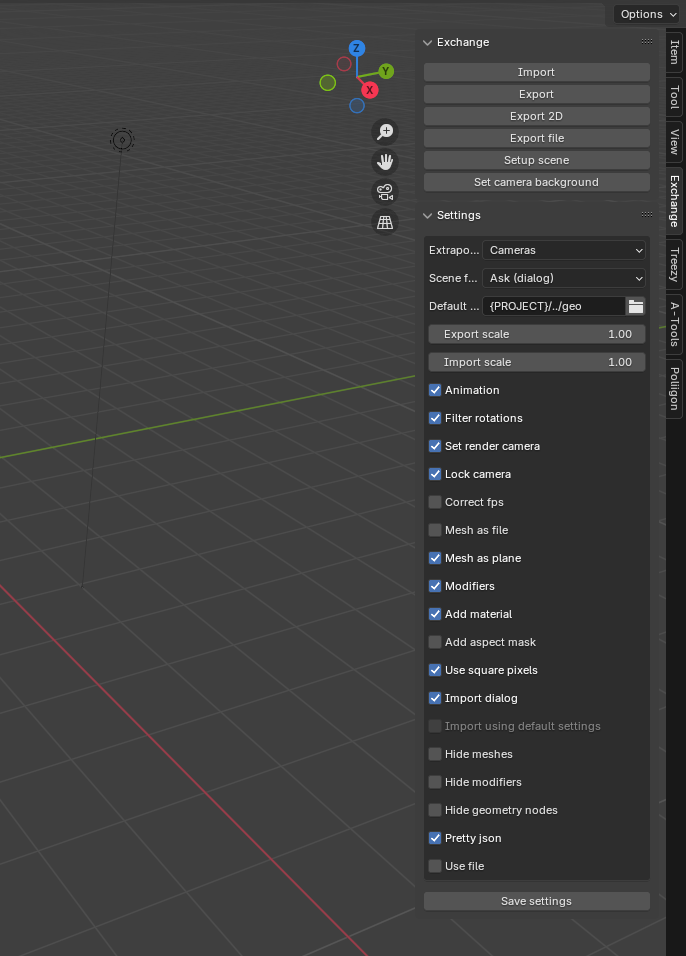
| Extrapolate |
Use linear extrapolation when importing animated objects. Options: All, Cameras, Locators, None. |
| Default path |
Default path for file exports. Multiple paths are separated by semi-colon. The first existing path will be used. Supports environment variables using $<name> syntax and tokens such as {PROJECT}. |
| Scene format |
Setup scene format using the exported scene, exported image, or a dialog box with all available resolutions. |
| Export scale |
Export scale for 3D objects (position, focus distance, etc.). Does not apply to container files (e.g., .usd, .abc). |
| Import scale |
Import scale for 3D objects (position, focus distance, etc.). Does not apply to container files (e.g., .usd, .abc). |
| Animation |
Export animation for 3D objects. |
| Filter rotations |
Apply a Euler filter to the rotation curves to avoid flipping between positive and negative values. |
| Set render camera |
Set the imported camera as the active render camera. |
| Lock camera |
Lock transform values for imported cameras. |
| Correct fps |
Ensure the current scene uses the same FPS as the import. |
| Mesh as file |
Execute the "Export as file" command for selected mesh objects. Otherwise, export mesh objects as locators. |
| Mesh as plane |
Export mesh objects that are single planes (no volume) as "cards". Ignored if "Mesh as file" is enabled. |
| Modifiers |
Evaluate the mesh geometry before exporting vertices or faces (planes). Note: Only vertex export supports animated modifiers. |
| Add material |
Add a new material to created mesh objects. |
| Add aspect mask |
Add an aspect mask to the camera (if possible). |
| Use square pixels |
Force the use of square pixels. Multiplies the width by the pixel aspect ratio. |
| Import dialog |
Open an import dialog for file import (e.g., .abc, .usd). |
| Import using default settings |
Import files (e.g., .abc, .usd) using Blender's default settings. Ignored if "Import dialog" is enabled. |
| Hide meshes |
Hide unselected meshes before export. This may speed up export time in some cases. |
| Hide modifiers |
Hide (unselected) meshes with modifiers before export. This may speed up export time in some cases. |
| Hide geometry nodes |
Hide (unselected) meshes with geometry nodes modifiers before export. This may speed up export time in some cases. |
| Pretty json |
If enabled, the exported JSON file will use "human-readable" formatting. This may slow down imports in non-Python applications like After Effects. |
| Use file |
Open a file browser for export/import of data. |